Today I want to tackle a topic that seems to be on everyone’s mind these days: What is the best way to schedule Pins? I wish I could just give you the “right” answer. But like everything else we’ve ever talked about when it comes to Pinterest, picking the best Pinterest scheduler is complicated! The best way to answer this question is to figure out what each scheduler offers and what you as a Pinterest business needs, and then go from there. It isn’t a one sized fits all and “all business owners SHOULD do this”… My Pinterest expert advices varies depending on your content marketing plan and needs.
So, let’s talk about Pinterest content scheduling and what strategy is right for you!
This post contains affiliate links, which means I may earn a small commission at no extra cost to you if you make a purchase.
Back to Basics
I want to start by reminding you that my Pinterest philosophy is all about the basics. If the “bones” of your strategy are good, the little tweaks you make here and there really don’t matter too much. Tactics such as finding the best time of day to upload and the optimal sizing of your Pinterest posts may all change, but the underlying strategy stays the same. In fact, I have been teaching Pinterest strategy since 2015 and although yes tactics change, the core of my strategy remains the same. Good Pinterest strategy is good Pinterest strategy when you know how to focus on the right things to grow on Pinterest. So, before we talk about what scheduling tool is right for you, let’s talk a little bit more about those basics!
Here’s the absolute bottom line: your Pinterest account will thrive with consistent effort. If you’re active at least once a day and regularly show up in a patterned behaviour for at least three straight weeks, your reward will be growth. Period. The end. In fact, we know from Pinterest that it takes about 3 weeks of a consistent pattern for Pinterest to establish your unique scheduling cadence (or publishing cadence). This is how unique Pinterest is. It adjusts based on your own account activity. So what works for you may be different than what works for your friend.

Some other Pinterest basic tips that are important no matter how you choose to schedule Pinterest posts include:
- Be consistent with your posting schedule. Spread your Pins out so you’re consistently pinning a sustainable number. In other words, don’t dump 50 Pins at the beginning of the month and then ghost for 30 days! Pinterest wants you to spread out your activity so it is even and consistent across a period of time.
- Don’t pin the same URL on the same day repetitively. So, if you have multiple Pins for one post, pin them one at a time on different days. This ensures a better user experience for regular Pinners. Please try to space things out. All you have to think about is what would the experience be like for a NEW Pinner landing on your account? Same thing over and over again? Poor! That won’t result in folks loving your content and hitting follow.
- You can re-pin the same image to different Pinterest boards, but make sure you don’t do it on the same day. Make sure there is a gap in time between them. The recommend space or gap depends on how much content you are sharing to Pinterest.
How TO be consistent?
This basic theme of consistency and commitment to show up regularly is why people turn to scheduling tools as an important part of their Pinterest marketing strategy. Plus, scheduling your content can really save you so much time and allow you to work ahead in your Pinterest efforts. The truth is, we don’t have the same amount of energy or creativity every day, so when the mood hits you it’s wonderful to make the most of small “burst” or “batch” work (e.g., get all your Pins scheduled for the entire summer in one sitting). Schedulers help us show up when we don’t want to or can’t! They also allow us to easily repurpose and reschedule existing Pinterest content and allow us to be in two places at once. So, no matter your budget or overall Pinterest strategy, scheduling Pins for a later date is a good idea.
Pinterest Scheduling Options: Pinterest vs Tailwind Vs Metricool
Today, I’m going to talk about three options you have for scheduling Pinterest posts. They all have their own pros and cons and none of them will be right for everyone, but they all work great for someone! Let’s see where you fit.
Native Pinterest Scheduler (Free)
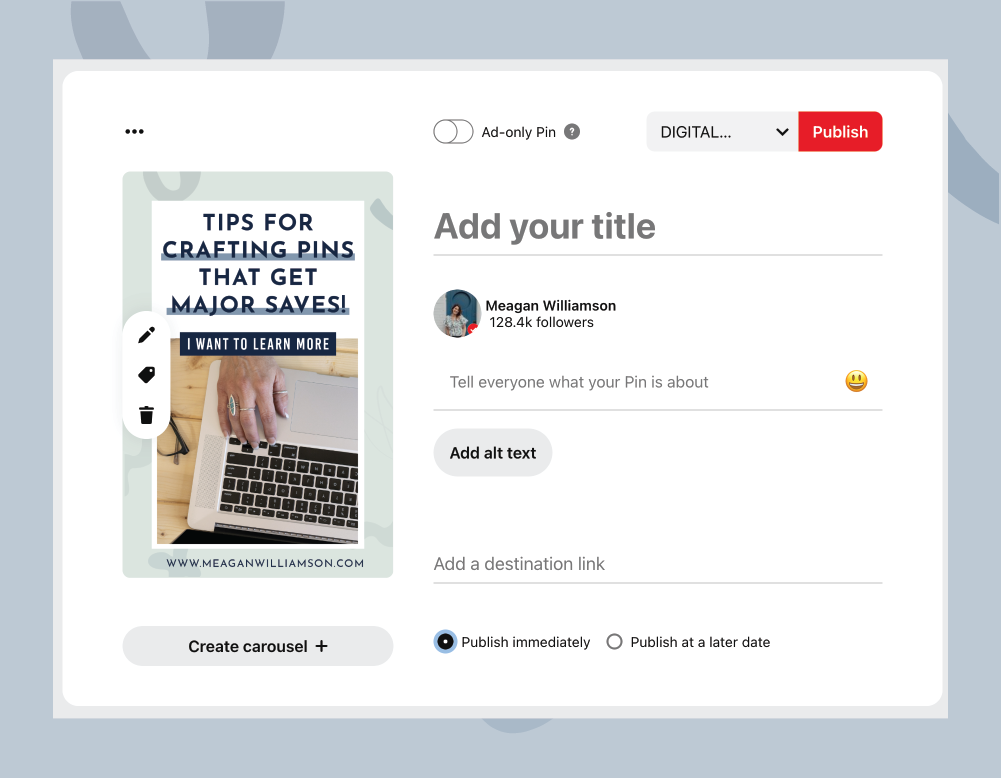
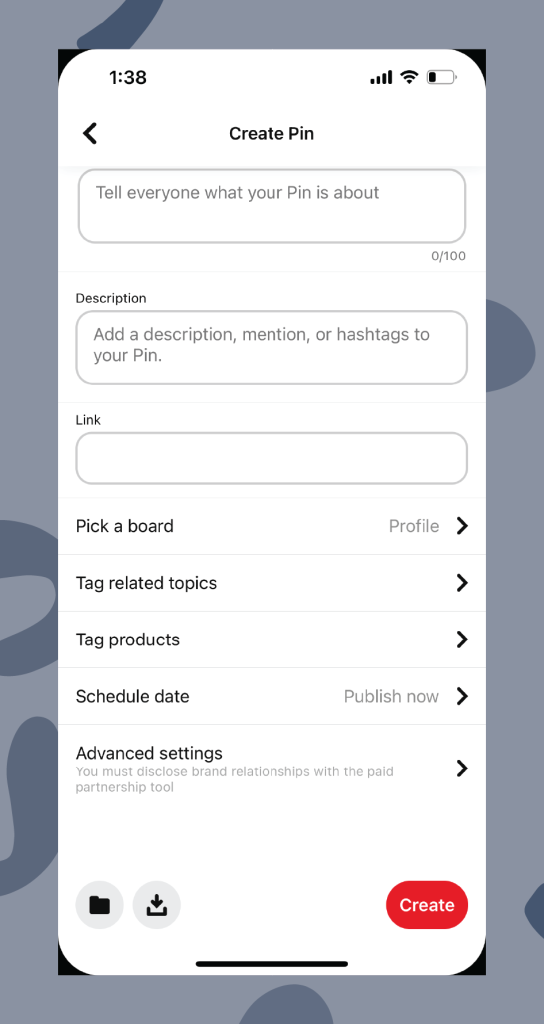
Pinterest has its own Pin scheduler, and I love it for a few reasons:
- It’s free! It costs nothing to use. You just can’t beat that, especially when you are just starting out.
- It allows for full keyword/SEO optimization of your content (Pin title, Pin description, tagged topics, schedule with product tags, etc.) that is not available with external schedulers. This means you can take full advantage of the SEO touchpoints that Pinterest allows you to use to distribute your Pins.
- Analytics from newly posted Pins are available instantly (if you are obsessed with your numbers, this is a very definite win).
- It allows for more dynamic content creation, especially for Idea Pins. Stickers, music library, more product tags, etc.
- Pinterest rewards us for showing up natively (in app), so using their scheduler just makes sense.
- Can schedule your Pinterest posts for up to 30 days out
However, there are also a few reasons I don’t love it:
- Can only schedule 30 days in advance. This is not very far if you have a lot of new content you are trying to space out. Other paid Pinterest post schedulers allow for further scheduling capabilities
- Can’t easily re-pin your content on the scheduler. You have to manually upload the Pin image and URL and put your text in again. It’s a bit clunky.
- Bulk Create feature: I don’t like it. There, I said it! I think it’s an extra step, and it’s a bit fussy.
- The Pinterest app is not the most user-friendly for scheduling, especially to upload. Once you have scheduled it, it’s messy! There’s no content calendar view and not much for an editing process.
- Mobile app vs. desktop upload drafts: You will not see your drafts from desktop on the app or the app drafts on desktop. The engineers treat desktop completely differently from your phone.
Tailwind APP SCHEDULING TOOL
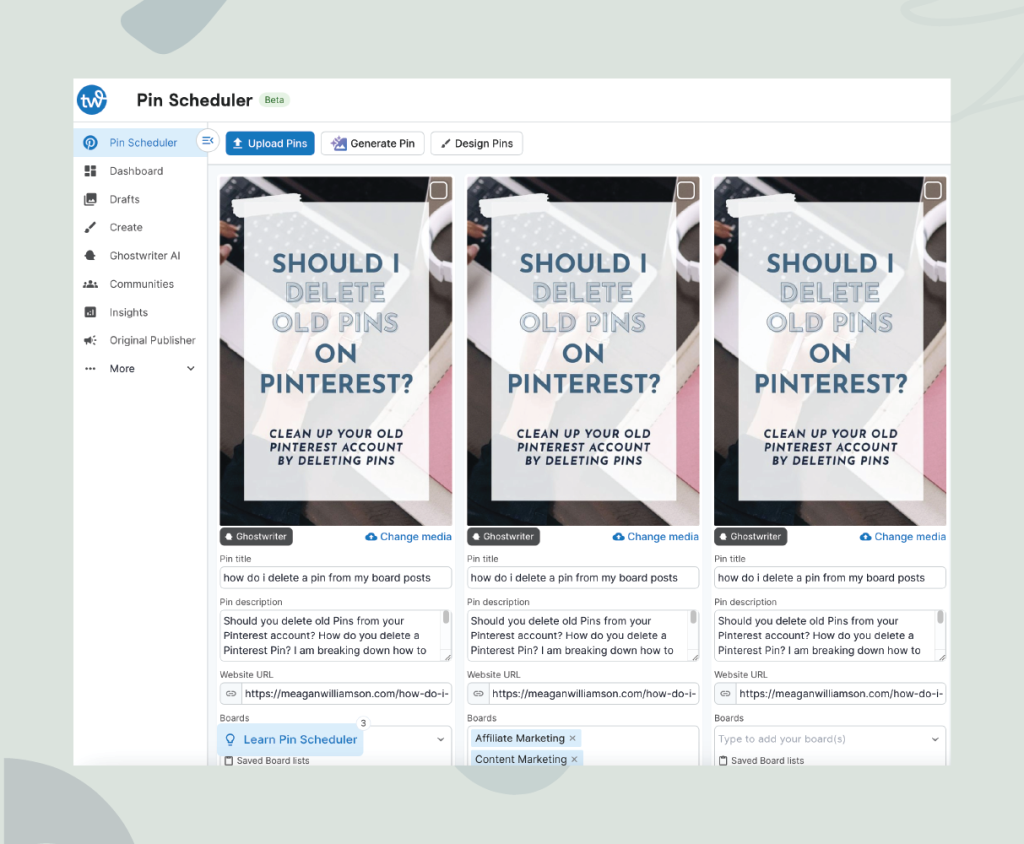
Tailwind is a longtime approved partner of Pinterest, so you really can’t go wrong using it (if an external scheduler is necessary). This means the engineers on both teams work together to achieve full integration. Positive things to consider include:
- It is an approved Pinterest partner.
- It is the most robust Pinterest scheduler (and always has been). They offer the most features that really do help save you time and get more consistent on the platform
- It’s perfect for people with a huge volume of content who do not have the time to schedule it all manually
- It has a lot of helpful and advanced features to assist in scheduling for high content producing businesses.
- You can work years in advance! This gives you firm control of when your scheduled pins go out. This makes it highly appealing to any business owner with limited time (and even those with low content). You can schedule out your content and walk away from your account for weeks and months at a time if need be
- It has rich board insights and different, more robust metrics. These aren’t available outside of Tailwind
- The Pin Inspector feature allows you to find high performing Pins, grab them easily, put them into drafts, and reschedule them (old image, old URL). I love this for saving time and re-distributing my high performing Pins again (selectively of course)
- Tailwind offers lots of great (free) tools for blogging like this Alt Text generator which I personally love
But wait! Tailwind isn’t always the perfect solution for everyone:
- It has a few glitches. Extra features like ghostwriting and image creation slow down the app. I know their team is working on it but it does slow down the program
- Prices have gone up over time. This can be a deal breaker for newer business owners or those not fully utilizing the app (hard to justify the investment if you don’t actually use it as much as you should)
- It offers extra marketing tools for email, Instagram, etc. Personally (and for my students and clients), we want Tailwind just for Pinterest so we aren’t interested in the other platforms.
- Their marketing often attracts small business owners who have aspirations of being more consistent but may not be “ready” for Tailwind just yet. It’s best utilized once you have a steady archive or schedule of content
- When content is scheduled in Tailwind, it has to come into Pinterest and then be indexed. So, we do not see the real time data on how the Pin is reporting because it has a delayed release. This delay has caused humors in the Pinterest marketing communities groups. I don’t personally see it often… But with anyone that you fulled automate and walk away from, you won’t see the full potential or growth possible
Metricool
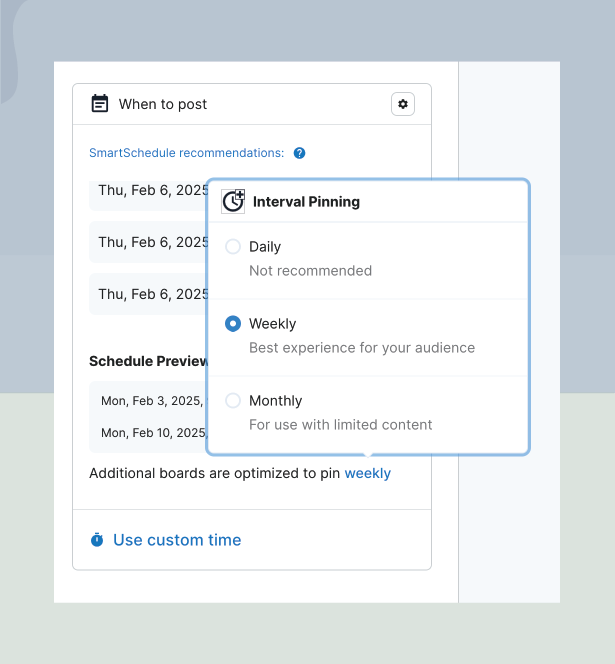
This social media management tool is gaining popularity in the world of Instagram and TikTok. I follow several social media managers/coaches on these social media platforms and they are all talking more and more about it, so it’s worth a mention! While it is NOT an official Pinterest partner, Metricool does have access to the API which means there is some integration. Pros of this service include:
- No extra frills (this could be a bad thing too, I suppose! I like it though).
- It is an all-in-one HUB for management of all your social channels (Threads, LinkedIn, YouTube, Instagram, etc.).
- It has really interesting, in depth analytics such as overall reach (particularly for Threads).
- You can see what you’re scheduling on a calendar view.
- It is a more reasonable price for what it is (the free plan is just fine when you’re starting).
The downsides to Metricool:
- The Pinterest engineers are not working with their team. This means there is a small risk of getting into trouble with your Pins (it just isn’t on the list of approved partners BUT does have API access)
- You will notice the same delayed release of analytics as with Tailwind.
- Metricool has no spot for Pin descriptions (uses meta descriptions). This feels like a disadvantage to me.
- I personally have been underwhelmed by the features but it works
Do you need to use a scheduler as part of your content strategy?
First of all, let’s be clear that Pinterest does not penalize pinners who use approved schedulers (or those with access to the API). So no worries there!
Remember that the name of the game for a successful Pinterest strategy is consistency. What you want to avoid:
- Dumping 50 new Pins once a month and walking away
- Repetitive pinning
- Pinning infrequently with no schedule
- Forgetting to pin or re-pin your high quality content
So, does using a scheduling app or program help with consistency? Absolutely! Do you need to spend a huge budget on outside tech to help you do this? No. In fact, it might not even be in your best interest as a small business owner and content creator to do this. Ask yourself a couple of questions before you commit:
Do I produce a volume of content that justifies the cost of an external scheduler?
If you’re only pinning once a day or have 5 blog posts to your name, you do not need one. Most people who hire managers have massive content banks (400 blog posts, 1000 products, etc.). To manage that sheer volume efficiently, Pinterest managers often require a scheduler so they aren’t doing it manually every day. So, recommendations often come from people with this kind of content and it’s just not relevant to everyone (especially new business owners just starting out). It could just be a shiny thing distracting you from the real work of building your business using good old fashioned quality Pins and a consistent schedule. I’m all about saving time and working ahead.
Can I trust myself to post consistently without it?
The other reason a scheduler can be necessary is if you won’t be consistent without it. If you can’t avoid the list of no-nos we talked about above due to a busy life, lack of clear routine in your workday, or lack of social media savvy, consider a paid tool to help you overcome these barriers. You could justify it even if you do not have a high volume of content, because we know you won’t get anywhere if you don’t post regularly. I have had many students who would not be consistent or have a thriving Pinterest account if it wasn’t for Tailwind. So I get that for some people, it is the app that allows them to be consistent and active on the platform.

What’s the best strategy in terms of Pinterest growth?
So. What is my recommendation? Find a strategy to achieve consistency that fits your budget and needs. But even if you decide that an outside scheduler is the way to go for your business, I would not recommend ignoring the Pinterest scheduler tools entirely! This is because Pinterest likes us to show up natively and you will be rewarded for that. And because the native Pinterest scheduler offers you the best features in terms of optimization (Pin titles and descriptions, tagged topics, etc.), it makes sense to create your NEW content right there. Focus on creating new content for your blog posts, products, and videos. Then schedule it using the native Pinterest scheduler to optimize it fully with total control and accurate numbers.
BUT if you really want to work farther ahead than 30 days (and I totally get that you do!), use the external scheduler as a complement to the Pinterest free tools. The bits and pieces or mechanics might change but this always remains true: create a schedule that utilizes the native Pinterest scheduler and an outside scheduler that maximizes the benefits of both. Using Tailwind or Metricool to find and re-pin old, high-performing content while using the free Pinterest scheduling tools for new content is one way to do this.
At a minimum, you want to schedule one new thing a day. When I publish a new blog post, I create 10 Pins per post. I use the Pinterest scheduler to schedule one Pin a day for 10 days, and put them onto different relevant boards. This ensures I’m sharing one fully optimized thing a day. Pinterest likes this best, but they understand it’s not feasible for small businesses to always schedule their Pins manually. I am currently using the free Tailwind for finding top content and getting it back in my schedule in a careful, strategic way. Then, I’m scheduling my own content through Pinterest. The truth is I enjoy being present on social media, so scheduling my own Pins manually does not feel like a chore to me! This is just one strategy I give you as an example. Yours might look different and that’s OK.
Was this discussion useful? If nothing else, I hope you came away with the idea that you don’t need all the bells and whistles to grow on Pinterest. Start simple. You do not need to spend a tonne of money to have success. After all, good content is good content! Focus on being a consistent and talented content creator, and the rest will come.
Announcing My Pinterest For Beginners Course
I have good news! If you read this post and want to know more about how to make Pinterest work for you, my course for beginners is ready and waiting. How to Use Pinterest for Business: The Ultimate Beginner’s Guide has everything you need to know to start a successful Pinterest business. This detailed course is the no-fluff, beginner-friendly Pinterest course designed to get you set up the right way, understand what actually works, and start seeing your content show up where it counts.
Inside this beginner Pinterest course, you’ll learn how to:
- Set up and optimize your Pinterest business account (the right way)
- Create Pinterest boards that actually get found in search
- Use keywords to get your Pins in front of the right audience
- Design simple but effective scroll-stopping Pinterest graphics (without being a designer)
- Write Pin titles and descriptions that drive discoverability and clicks (even as a beginner)
- Know what to pin, where to pin it, and how often to post
- Understand your Pinterest analytics so you can grow with confidence
What are you waiting for? Click here to sign up and start learning today!
Love this? Save this Pinterest Pin for later!

Meagan Williamson is a Pinterest marketing expert and strategist with over a decade of hands-on experience helping businesses build sustainable, search-driven traffic. She is the founder of Pin Potential and was personally invited to join Pinterest’s early beta program in 2011, giving her rare, long-term insight into how the platform actually works. With a background as a trained psychologist and certified business coach, Meagan blends data-backed strategy with human-centered marketing to help creators and brands grow consistently without relying on trends or social media burnout. Her work focuses on long-term visibility, audience trust, and scalable growth through Pinterest-led content ecosystems.